Docs Concepts
Zara
The assistant that sees your machines and what they can do, builds the service that fits, and looks after it with you.
Zara is the assistant of Zadara Edge Compute. You describe in plain language what you want to run, and it builds the service with what your machines have. Before creating anything, it shows where it will run. After that, it looks after the service with you: it adjusts it, runs it and tells you how it went.
What it sees
Every time you talk to it, Zara reads the state of your environment:
- the machines you can use and that are ready now, with their size, free memory, system and place;
- what is installed on them: the tools and the local AI models of your fleet;
- the AI models your account can use, with their price range;
- the ready services your fleet can actually run, because the tool is there or can be installed on the first job.
That is why its suggestions fit your company, and not a generic one.
Before creating: from the idea to the plan
- It asks what it needs, and no more than that. Two questions at most, and then a plan.
- It picks the way. A ready service that already solves it, a new file-processing service written for your case, or a service that answers with AI, with the model recommended by how complex the work is. If you ask, it links your GitHub repository as a pipeline.
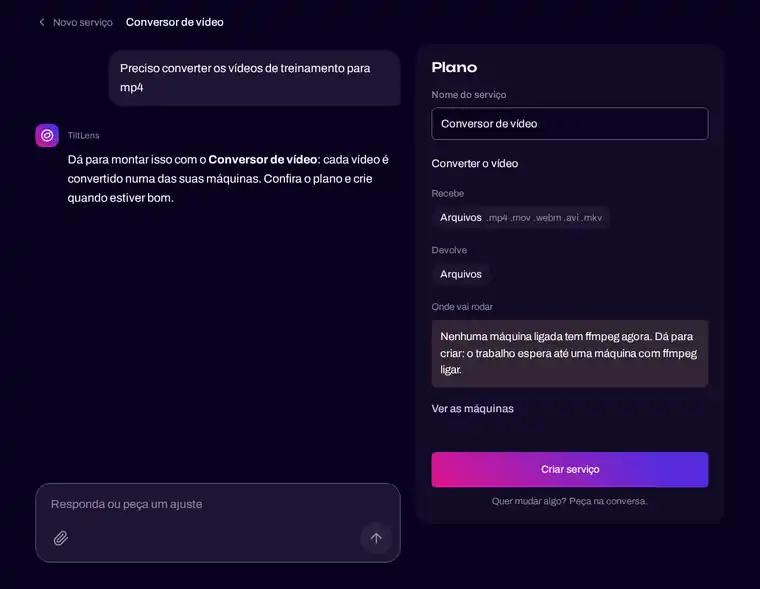
- The plan shows where it will run: which machines can take the work, and in what order. If no machine has what the service needs right now, it says so before you create it.
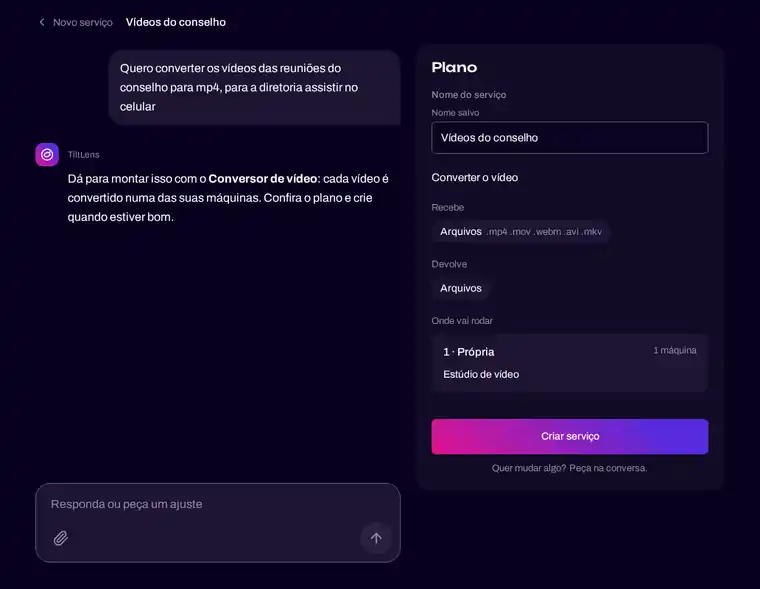
- Only you create. You adjust the plan by talking, and nothing exists until you click to create it.
After creating: it looks after the service with you
Inside each service, the same assistant answers by the service’s name.
- It says how things are, with data read from the platform: the status, the link, and the last job step by step, with the machine and the time of each step.
- It changes the service when you ask. A new name, a new instruction, a different way of processing: each change becomes a new version, the original is kept, and the last change can be undone.
- It runs work for you. Attach the files and say how: “at most three machines”, “Windows only”, or machines by name.
- It says no, and why. When no machine is ready, when a format is not accepted, or when a machine name does not exist in your fleet.
Its name is yours
Zara uses your account’s AI. In a partner’s brand, it takes the partner’s name.
See it at work in Build with Zara.